
Use Geode as a meeting transcription workflow for in-person meetings or online meetings where a bot does not belong. Record on iPhone, iPad, Mac, Android, or Windows, then turn the meeting into a searchable transcript and reviewable summary.Local-first by default, with cloud processing only when you choose it.Geode is not a meeting bot. It does not join your call, appear as another participant, or depend on a meeting-platform plugin.
 On-device transcription, no bot, one account across devices. Free plan included — paid plans from $4.17/mo.
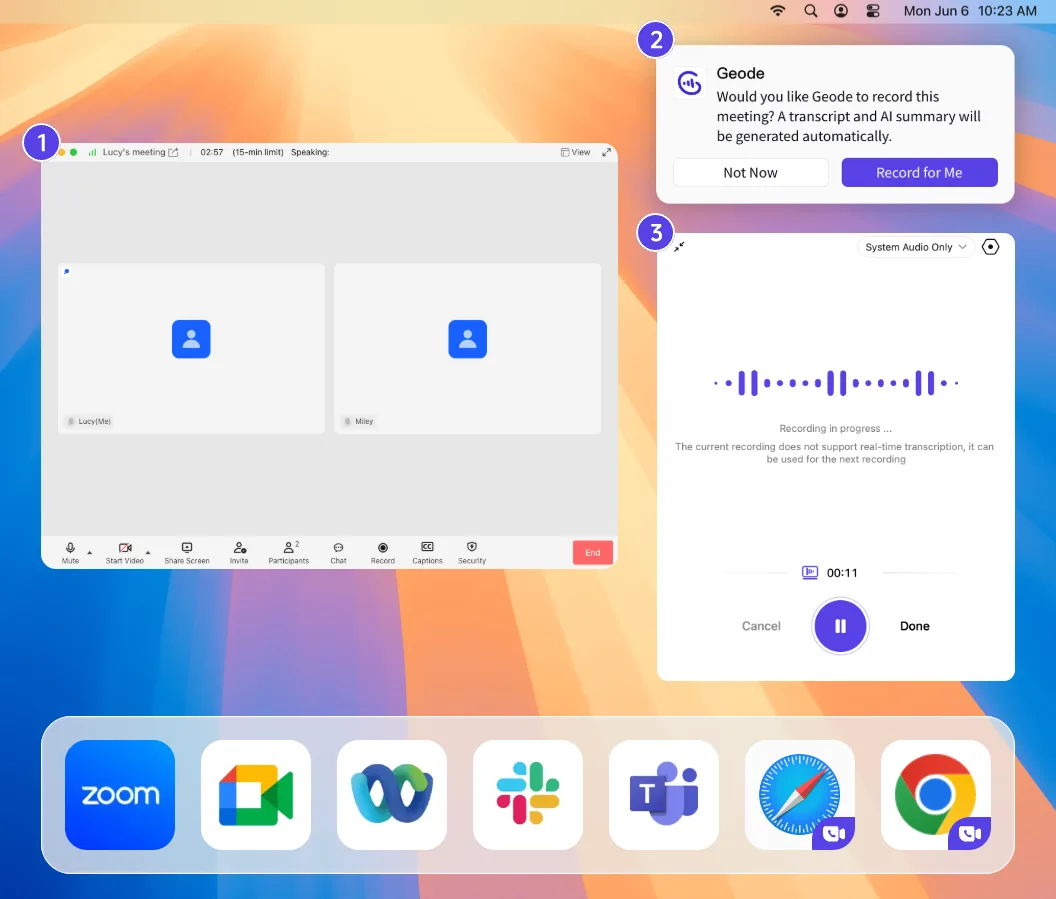
 No bot in the meeting.
 No platform plugin required.
Geode records from your own desktop or phone, so you can transcribe meetings without inviting an AI notetaker into the room, installing a platform-specific plugin, or depending on one meeting platform — and without per-minute billing eating into long meetings.
This is useful for in-person meetings, confidential one-on-ones, client conversations, research discussions, and online meetings where another participant or meeting bot does not belong.
After the meeting, Geode turns the recording into a searchable, speaker-separated transcript you can review against the original audio — with local AI summaries available on Mac.
* Always make sure you have permission to record a meeting.
Geode helps you capture meetings from your own desktop or phone, then turn the recording into a searchable transcript, reviewable summary, and follow-up notes.
Capture in-person conversations or online meetings directly from your Mac or iPhone, without inviting another participant into the meeting.
Turn speech into accurate, speaker-separated text. On-device transcription can run locally, so your meeting audio does not need to leave your device to become a transcript.
Get a clear recap, follow-ups, and searchable notes you can review against the original audio. On Mac, local summaries can run on-device; cloud summaries are available when you choose them.
Capture in-person conversations or online meetings directly from your desktop or phone, without inviting another participant into the meeting.
Turn speech into accurate, speaker-separated text. On-device transcription can run locally, so your meeting audio does not need to leave your device to become a transcript.
Get a clear recap, follow-ups, and searchable notes you can review against the original audio. On Mac, local summaries can run on-device; cloud summaries are available when you choose them.
Geode is useful when you want to record the meeting yourself, keep the workflow under your control, and turn the conversation into searchable, reviewable material afterward.
Place your phone or desktop in the room and record the conversation. Geode transcribes the discussion and helps you create notes afterward – useful for client meetings, one-on-ones, research discussions, interviews, and small team conversations.
For Zoom, Google Meet, Microsoft Teams, or other online meetings, use Geode when you do not want to invite a meeting bot, install a platform-specific plugin, or depend on a single meeting platform. Record from your own desktop or phone, then review the transcript and summary afterward.
* Always make sure you have permission to record a meeting.
Geode makes the data path clear, so you know when your meeting stays on your device and when you choose to use cloud processing.
* For sensitive meetings, you can keep the workflow local. For other meetings, you can choose cloud processing when it is useful. The choice stays with you.
Some meetings should not be uploaded by default: client conversations, internal discussions, research sessions, one-on-ones, or sensitive in-person meetings.
Geode gives you a local-first meeting transcription workflow. With local processing, your meeting recording, transcript, and Mac local summary stay on your device. When cloud transcription or cloud summaries are useful, you choose them intentionally.
Can't find the answers you're looking for? Click the button below to find the answers you need.
Bot-free meeting transcription means recording and transcribing a meeting without adding an AI notetaker, meeting bot, or platform-specific plugin. Geode records from your own desktop or phone, then turns the recording into a searchable transcript and reviewable summary.
No. Geode is not a meeting bot. It records from your own desktop or phone, so you do not need to invite an AI notetaker, install a platform-specific meeting plugin, or add another participant to the meeting.
Yes - when you choose to record the meeting from your own device instead of adding a meeting bot. Geode is useful for online meetings where you want a local-first workflow, do not want another participant in the meeting, or need a recording you can review privately afterward. Always make sure you have permission to record.
Yes. You can place your phone or desktop in the room, record the conversation, and turn the meeting into a searchable transcript and reviewable notes afterward.
Geode is designed for in-person meetings and online meetings that you record from your own desktop or phone. It is not positioned as a phone call transcription tool. For any meeting or conversation, always make sure you have permission to record.
Yes. Recording and on-device transcription can run offline. On Mac, local summaries can also run on-device. Internet is only needed for downloads, updates, subscription verification, optional cloud features, and optional crash reporting if enabled.
No. Cloud transcription and cloud summaries are optional. You choose when to use them. For local workflows, Geode processes the meeting on your device.
Yes. Geode can generate meeting summaries, follow-up notes, and reviewable meeting material. On Mac, local summaries can run on-device; optional cloud summaries are available when you choose them.
Your recordings and transcripts are stored on your device. If you choose cloud transcription or cloud summaries, the required audio is encrypted and uploaded for processing. Once the task is complete, your data is permanently deleted from our cloud servers.
Geode is available for iPhone, iPad, Mac, Android and Windows. For this meeting workflow, you can record meetings on your device. On Mac, local summaries can also run on-device, in addition to recording, transcription, and supported translation.
The Discord is the fastest way to get a real answer.
Adding {{itemName}} to cart
Added {{itemName}} to cart